
Choosing production scheduling software is rarely decided by the feature list: almost every tool shows a Gantt chart, resource management and a link to the ERP. The difference appears when you test the tool on a real case from your shop floor: a machine that breaks down, an urgent production order, an absent operator. This guide gives ten criteria, how to check each one in a demo, and the pitfalls we often see in industrial SMEs.
Key points
- Production scheduling software decides which resource performs which operation, and when, based on its real availability.
- Judge it in a demo on your own data: your workshops, your resources, three of your production orders and a real disruption.
- The criteria that separate tools the most: finite capacity, rescheduling after a disruption, alerts, working without an ERP, the link with shop floor execution, and time to go live.
- The table and the list of questions below can be copied as is into your evaluation grid.
What is production scheduling software?
Production scheduling software assigns each operation of a production order to a specific resource (machine, workstation, operator) and to a specific time, while respecting that resource’s availability and the order’s due date. It works after planning, which spreads operations across workshops over the coming weeks without yet choosing the machine or the time.
Two ways of scheduling coexist on the shop floor:
- calendar-based scheduling, in a Gantt chart: each operation gets a resource and a start date;
- priority-based scheduling, in Kanban: each resource gets an ordered list of tasks, with no precise time. It suits workshops where tasks are very short.
A good tool covers both, because the same plant often has a machining workshop scheduled by the hour and an assembly workshop working from a priority list.
Before the demo: prepare a real case
A demo run on the vendor’s data always shows a clean schedule. To judge a tool, bring an extract of your production:
- one workshop with its resources and their working hours (shifts, closed days);
- three or four real production orders, with their routings, times and due dates;
- a recent disruption: breakdown, customer rush order, late material, absence;
- the file or export you use today (spreadsheet, ERP export).
If you are also preparing a request for a quote, add the number of resources to schedule, your monthly volume of production orders and your current system (ERP, spreadsheet or paper).
10 criteria for choosing production scheduling software
1. Finite or infinite capacity
With infinite capacity, the software places operations on their dates without checking whether the resource is already busy: the load can exceed 100% and nothing moves. With finite capacity, an operation can only be placed where the resource is available. For a workshop, only finite capacity gives credible end dates. Also check that the tool shows load against capacity, per workshop and per resource.
2. Gantt and Kanban
The Gantt chart is for the workshop manager who places operations machine by machine. Kanban is for the one who hands out short tasks to a team. Ask whether both views exist and whether each workshop can choose one or the other.
3. Priorities and alerts
A schedule that drifts without warning anyone is useless. Look at which alerts the software raises (operation late against its planned window, production order whose expected end exceeds the requested date, operation not yet scheduled) and how it handles a request to change a priority or a due date.
4. Resource calendars
Capacity depends on the working hours of each machine and each person: shifts, absences, maintenance, public holidays. Check that you can enter a recurring calendar per resource, one-off unavailability, and closures shared by the whole site.
5. Rescheduling
Test the scheduling software on a Monday morning after a breakdown. How many clicks to move an operation to another machine, shift a production order or rerun the automatic placement of pending operations? Can you prepare changes before saving them?
6. Working with or without an ERP
Many SMEs have no ERP, or one that is hard to connect. Check three paths: entering production orders directly in the tool, importing CSV or Excel files exported from the ERP, and an API for automatic exchanges. Also ask what happens when a production order is changed in the ERP after the import.
7. Link with shop floor execution
A schedule that nobody updates becomes wrong within a few days. Ideally, operators see their tasks in the planned order and report quantities, stoppages and completed operations, so the schedule corrects itself from what really happens. See our page on production tracking.
8. Time to go live
Ask for a duration to get a first workshop into real production, and what it includes: resource setup, data import, training. A project that starts with a pilot workshop delivers a visible result faster than a plant-wide rollout.
9. Hosting and data
Software hosted by the vendor or installed on your servers: ask for both options, the country where data is stored, and how to get your data back if you change tools.
10. Support
Who sets up the tool with you, who trains workshop managers and operators, and who answers after go-live? Also ask whether documentation exists for each screen in your language.
The grid to use during the demo
| Criterion | What to check in the demo | Why |
|---|---|---|
| Finite capacity | Place an operation on a machine that is already busy: does the software refuse it or shift it? | Without finite capacity, end dates are optimistic |
| Load and capacity | Show a workshop’s daily load against its capacity | See overload before it causes delays |
| Gantt and Kanban | Open one workshop in Gantt, another in Kanban | Each workshop has its own pace |
| Priorities | Make a production order urgent and see what moves | Rush orders are daily life in SMEs |
| Alerts | Make an operation late and look where the alert appears | A drift must be visible without searching |
| Calendars | Enter an absence or maintenance, then look at capacity | Real capacity changes every week |
| Rescheduling | Simulate a breakdown and reassign the machine’s operations | This is the most frequent use of the software |
| No ERP / import | Import your CSV or Excel file during the demo | Start without an integration project |
| Execution | See the operator screen and a quantity report | A schedule that is not updated becomes wrong |
| Go-live | Ask for the plan of the first weeks, step by step | The announced timeline must be concrete |
| Hosting | Ask for the hosting country and the on-premises option | IT constraints and confidentiality |
| Support | Ask who sets up, who trains and who answers afterwards | Adoption depends on support |
Score each criterion from 1 to 3 during the demo, then compare the tools line by line.
Pitfalls seen on the shop floor
- Judging on a generic demo. A demo schedule has no breakdown, no absence and no urgent order. Insist on your real case.
- Wrong routing times. The best algorithm produces a wrong schedule if operation times are wrong. Check your routings before judging the tool.
- Calendars never updated. If absences and maintenance are not entered, the displayed capacity is wrong. Ask who will do it, and how long it takes.
- Automatic placement that cannot be corrected. The workshop manager knows constraints the software ignores. If they cannot move an operation by hand, they go back to their spreadsheet.
- The same tool for every workshop. Forcing an hourly Gantt on a workshop with tasks of a few minutes creates useless data entry. Kanban is enough there.
- A schedule cut off from the shop floor. Without progress reporting, nobody sees that an operation is late until the customer calls.
- ERP integration as a prerequisite. Waiting for a full ERP connection before starting can block the project for months. A file import lets you start; the connection comes later.
Questions to ask during the demo
- Can you create one of our workshops live, with its resources and their working hours?
- What happens if I place an operation on an unavailable machine?
- How does the software automatically place pending operations, and can I correct the result?
- A machine breaks down: show me how to reassign its operations.
- A customer brings their date forward: how is the request handled and who approves it?
- Where do I see operations that are late against their planned window?
- Can you import our CSV or Excel file now?
- What does the operator see at their workstation, and what do they report?
- Two people edit the schedule at the same time: what happens when saving?
- How long to get a first workshop into production, and with which steps?
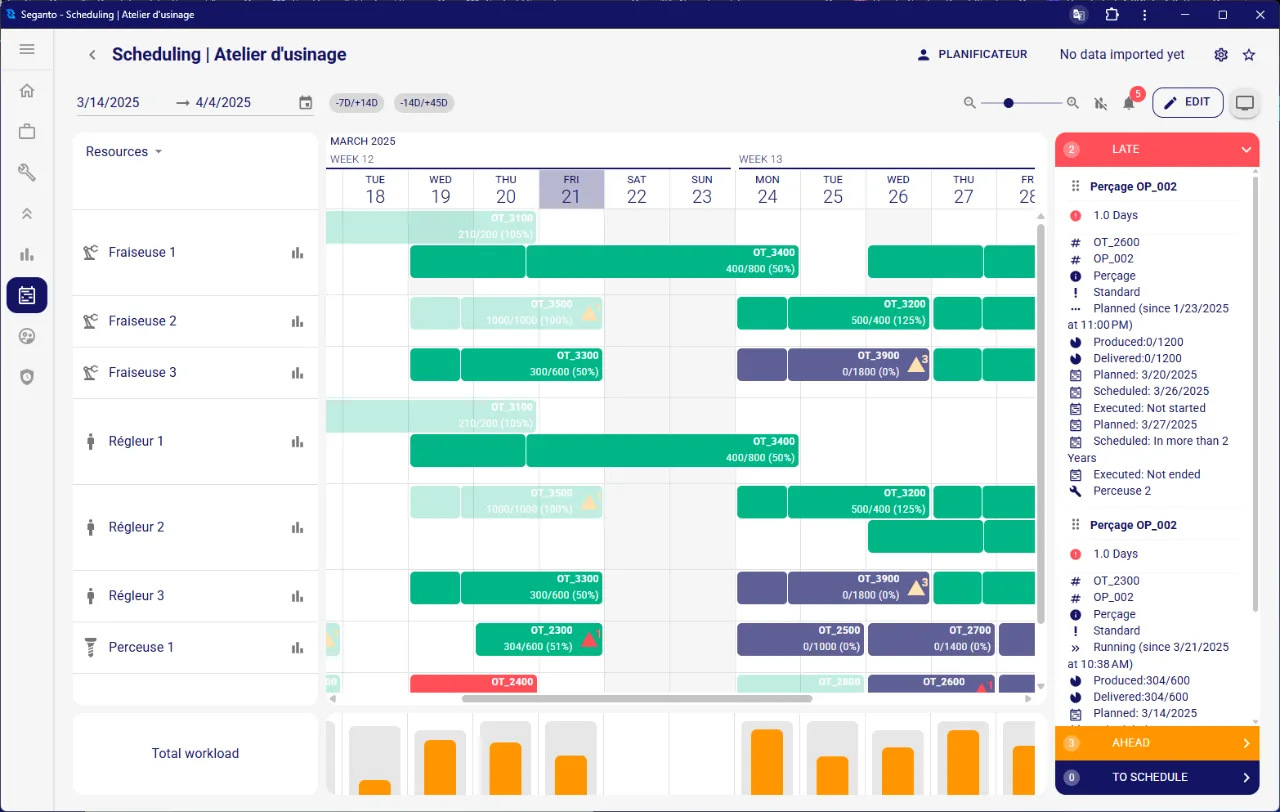
What Seganto shows in a demo
Seganto is production scheduling software designed by dgtis for industrial SMEs. Here is what you can check against the grid above:
- Gantt and Kanban: calendar-based scheduling places operations by drag and drop on a resource and a date; Kanban gives each resource a priority list.
- Availability: each resource has a recurring calendar, with one-off unavailability and site-wide unavailability. Cells where a resource is unavailable cannot receive the operation.
- Automatic placement: one button searches, from the start of the planned window, for the first free resources able to perform the operation, and another processes all pending operations.
- Rescheduling: changes are prepared in edit mode, then a summary is shown when saving. If another user changed the schedule in the meantime, you choose between the two versions, change by change.
- Alerts and priorities: the alert center groups planning and scheduling delays, drifts and operations to schedule; requests to change a due date or a priority are approved by the planner.
- Data: direct entry of production orders, CSV file import, ERP connector or API. Seganto works with or without an ERP.
- Execution: operators see their operations in the order and on the dates of the schedule, and report quantities, interruptions and their causes.
- Go-live and hosting: up and running in 15 days, hosted in Switzerland or on your servers. The Deploy Seganto page describes the method.
Frequently asked questions about choosing production scheduling software
What is the difference between planning and scheduling?
Planning spreads the operations of a production order across workshops, week by week, to meet the due date. Scheduling then chooses the specific machine or operator and the time of each operation, within the planned window.
Does production scheduling software replace the ERP?
No. The ERP manages orders, purchasing and accounting. The scheduling software receives production orders from the ERP, or from files, and organizes how they are carried out on the shop floor.
Should you choose a finite capacity tool?
For a workshop where machines and people are often fully loaded, yes: finite capacity prevents placing more work than a resource can do, and gives realistic end dates.
How long does it take to get started?
It depends on the tool and on the state of your data. Ask for a duration to get a first workshop into real production. With Seganto, the announced go-live time is 15 days.
Can you test on your own data?
It is the best way to compare. Bring one workshop, a few real production orders and a disruption, and ask the vendor to handle them in front of you.
Test the grid on your workshop
Book a demo with no commitment: bring your resources, a few production orders and a recent disruption, and we will handle them with you in Seganto.
Book a demoDiscover the scheduling software