
In many industrial SMEs, the schedule lives in a spreadsheet updated in the morning. At 10 a.m., a machine breaks down, a batch of material arrives late, a customer brings a date forward. The file stays as it is until the next day. Real-time shop floor scheduling closes this gap: the schedule updates with what actually happens on the shop floor. Here is what “real time” means in practice for an SME, where the data comes from, who reacts, and how to move from the spreadsheet to a connected schedule.
Key takeaways
- A schedule is “real time” when it receives shop floor progress as it happens: operator declarations and, if they are connected, machine data.
- What updates: production order progress, delays, workstation load and the estimated end of an operation based on the actual cycle time.
- Real time is useless without a reaction loop: alerts sorted by severity, fast rescheduling and traceable priority requests.
- The right method starts with a pilot workshop and simple declaration rules, before connecting the machines.
What does “real-time shop floor scheduling” mean?
Real-time shop floor scheduling is a production schedule that constantly compares what was planned with what has been done, based on data entered or captured on the shop floor, and flags deviations as soon as they appear.
For an SME, “real time” does not mean “to the millisecond”. The schedule is as fresh as the last piece of information received. If an operator declares the quantity produced every hour, the schedule is one hour fresh. If the machine sends its part counter, the freshness is that of the counter. The real question then becomes: which information comes back, how often, and who looks at it?
A spreadsheet only knows what someone types into it: a delay only shows up when someone notices it and shifts the rows.
Where the data in a connected schedule comes from
On top of the production orders coming from the ERP or a file, a connected schedule is fed by two sources on the shop floor.
Operator declarations
This is the main source, and it is enough to get started. In Seganto, each operator sees their operations on a tablet, in the order and at the dates set by the schedule. They start the operation, declare an interruption by choosing a cause, update the quantity produced and complete the operation. An option indicates whether the declared quantity is available to the next workshop, so the next operation can start on those parts.
A workshop without individual tablets can use a shared screen: each operator selects their name, sees their tasks and declares their work without logging in with their own account.
Connected machines
When the machines allow it, a connector suited to each machine type sends back their states (running, stopped, in alert, disconnected) and their part counters. This data complements the declarations: it tells you whether the machine is running and at what cycle time, without waiting for the operator to enter anything.
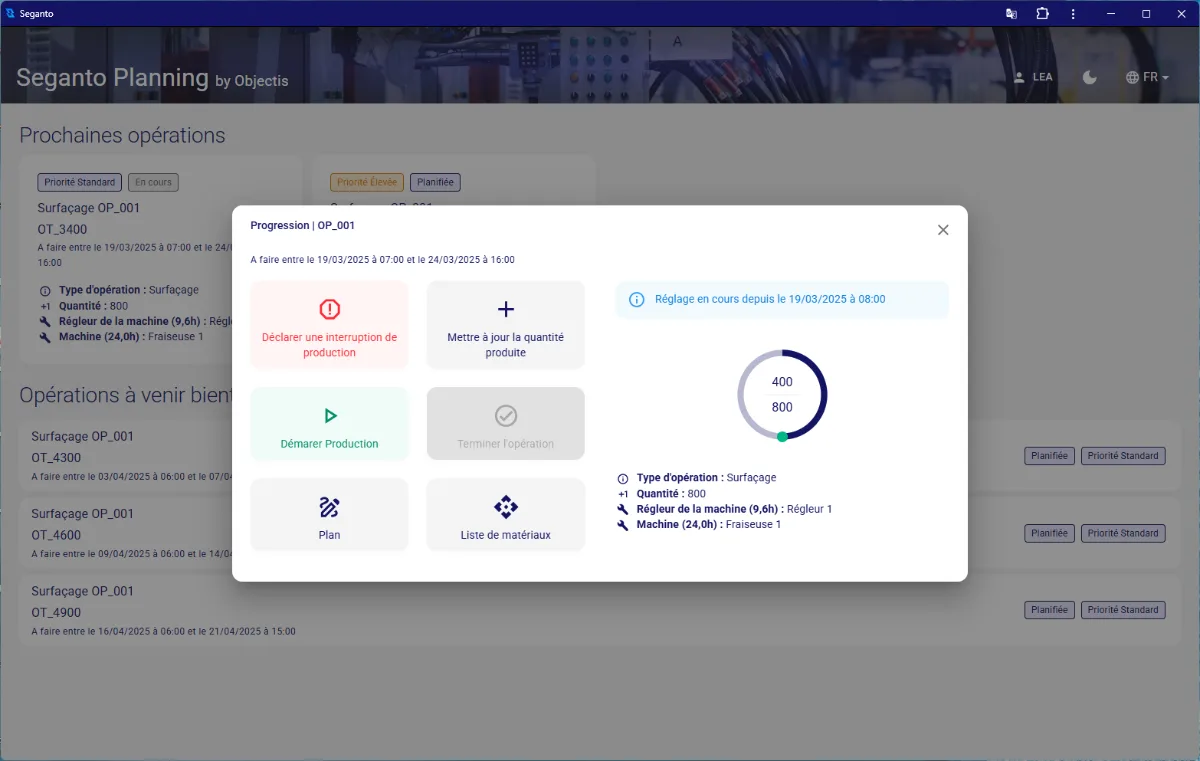
What updates in real time on the shop floor
Once this data is received, several elements of the schedule change without manual intervention. The table below compares them with a schedule kept in a spreadsheet.
| Information | In a spreadsheet | In a connected schedule |
|---|---|---|
| Production order progress | Entered by hand, often at the end of the day | Quantities declared per operation, visible in the production order planner |
| Late operations | Spotted when someone rereads the file | Operation color in the scheduler and an alert in the alert center |
| Workstation load | Recalculated by formula, if the file is up to date | Recalculated each time an operation is moved |
| End of an operation in progress | Estimated from memory by the shop floor manager | Expected end time calculated from the current cycle time (connected machine) |
| Machine status | Unknown without walking onto the shop floor | Running, stopped, in alert or disconnected |
Progress and delays
In the Seganto scheduler, the color of an operation shows where it stands: green when it is in progress and on time, red when it has started and is late, dark red when it has not started and is late. The production order planner adds an execution line with the start, the end and the quantity produced for each operation.
Estimated end of an operation based on the actual cycle time
On a connected machine, the live supervision card shows the expected end time calculated from the current cycle time, the part counter since the start of the operation, the time elapsed since the counter last changed, and the gap between the actual and the theoretical cycle time. The next scheduled item is shown at the bottom of the card. The shop floor manager therefore knows, without moving, whether the operation will finish on time.
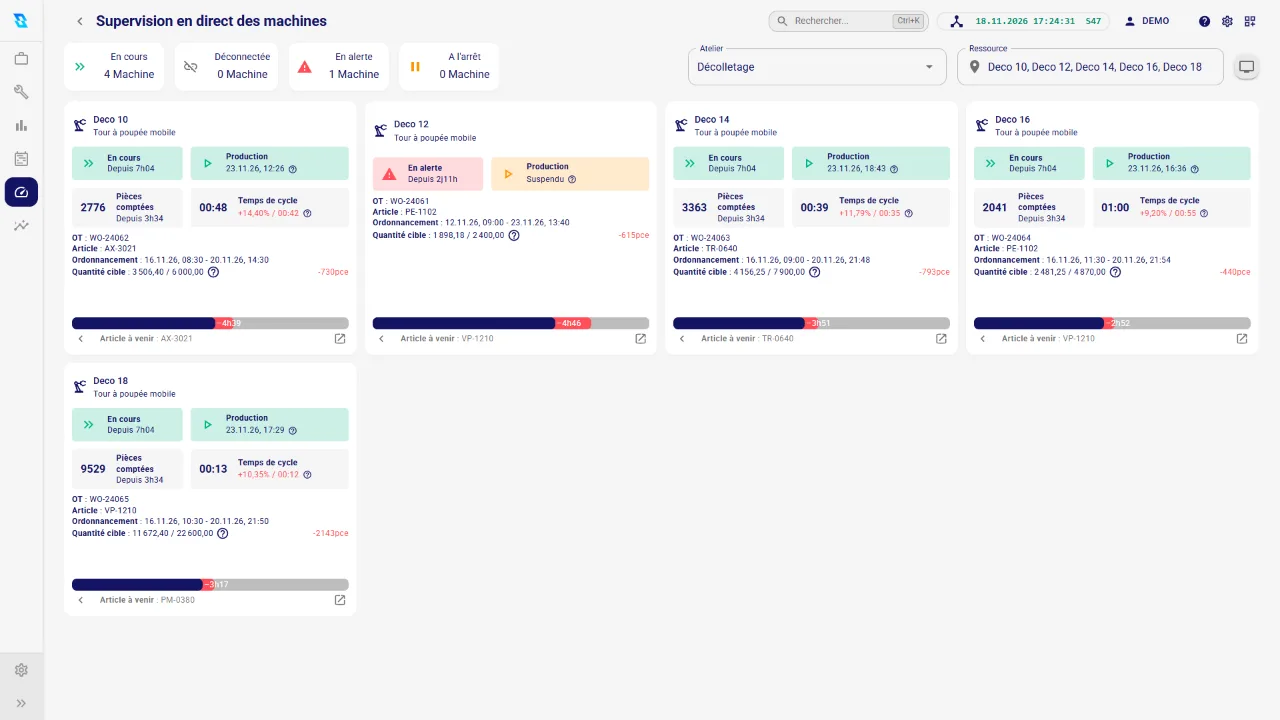
Real-time production dashboards
For the overall view, the “In progress” page shows a workshop’s progress over the week, evaluated at the present moment for the current week: cumulative quantity produced, remaining planned work, late quantities and the breakdown of operations by status (ready, in progress, late). These dashboards can also run on a TV screen on the shop floor, along with the scheduler or machine supervision in read-only mode.
Who reacts, and how
Seeing a delay does not solve it. Real-time shop floor scheduling becomes valuable when each deviation reaches the right person along with a way to act.
The alert center
Seganto gathers the deviations it detects in an alert center, sorted by severity: execution running late compared with the plan, production orders whose planned end exceeds the requested end, operations scheduled late or early compared with their window, operations not yet scheduled as their planned start approaches (7 days by default, adjustable per workshop). Each alert links to the screen that resolves it: the production order planner or the workshop scheduler.
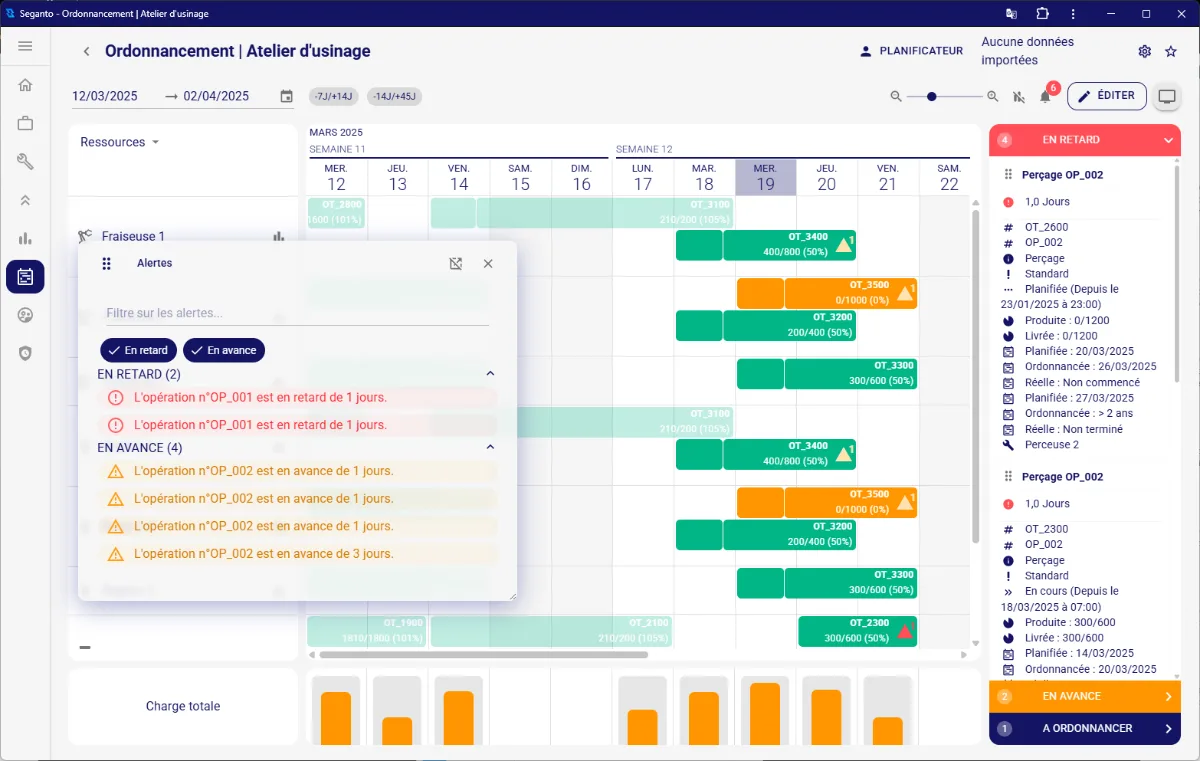
Rescheduling
When a production order no longer holds, the planner can reschedule it to a new end date: Seganto rebuilds the time windows backwards from that date. To move a block of operations, simply shift an operation and the ones that follow by a number of days, or move all the operations of a production order at once in the multi-order planner. On the shop floor side, the shop floor manager can shift an operation and all the following ones on the same machine while keeping the gaps, or let Seganto automatically schedule the remaining operations. A summary lists every change before saving.
Priority requests
The people who promise dates to customers create a prioritization request on a production order: new requested end, new priority. The planner reviews it in a review schedule, then accepts or rejects it with a message. The decision is kept in the history of the production order’s requested end. An urgent request thus goes through a traceable request rather than a simple phone call.
Moving from the spreadsheet to real-time shop floor scheduling: 6 steps
- Make the list of production orders reliable. Each order needs a stable reference, a quantity, a requested date and a routing with its times. Seganto imports them from the ERP via API or from a CSV or Excel file, with an import key that updates an existing order instead of creating it again.
- Describe the resources and their calendars. Machines, workstations and people, with their working hours and closures. Without an accurate calendar, no schedule holds, connected or not.
- Choose a pilot workshop. A workshop where delays are costly and where the shop floor manager is willing. Production orders are planned there, then operations are scheduled on the resources.
- Set the declaration rules. Who declares, on which screen, and when: at the start, at each interruption with its cause, at each pallet or each hour, at the end. Simple rules that are followed are better than complete rules that are ignored.
- Set up the reaction routine. The alert center checked every morning by the planner, the “In progress” page reviewed at the end of the week, the TV screen on the shop floor.
- Connect the machines, afterwards. Once declarations are in place, connected machines provide the actual cycle time and the expected end without any additional input.
Common pitfall: keeping the spreadsheet in parallel “just in case”. Two schedules mean two versions of the truth, and the shop floor ends up following the older one. Set a date from which only the connected schedule is authoritative for the pilot workshop.
Checklist: are you ready for a connected schedule?
Tick the points that are already true in your workshop. The missing points are your preparation plan.
- Your production orders have a unique reference and a requested delivery date.
- Your routings show the sequence of operations and roughly realistic times.
- You know which resources (machines, workstations, people) perform each type of operation.
- The working hours and closures of each resource are known.
- One person is responsible for the schedule and has time to react to alerts every day.
- Operators have access to a screen: an individual tablet or a shared workstation.
- You have a short list of stop causes that operators can choose from.
- You know which machines can send back their states and counters, even if you do not connect them right away.
- A pilot workshop has been chosen, with a willing shop floor manager.
If most of these points are true, you can start on a pilot workshop. If not, start with the data: list of production orders, routings and calendars. Our article on calculating load and capacity helps you check your times and capacities.
How Seganto helps
Seganto brings together in a single piece of software production order planning, workshop scheduling (calendar or Kanban), shop floor execution and machine supervision.
- Finite capacity planning and scheduling, with workstation load recalculated at every change: see the planning and scheduling software.
- Operator declarations on a tablet or shared screen, documents and traceability: see production tracking and MES.
- Alert center, rescheduling of a production order or a group of operations, traceable prioritization requests.
- Up and running in 15 days, with or without an ERP (CSV or Excel files, API), hosted in Switzerland or on your own servers.
Frequently asked questions about real-time shop floor scheduling
Do the machines need to be connected to schedule in real time?
No. Operator declarations are enough to track production order progress, delays and load. Connected machines add the machine status, the part counter and the expected end based on the actual cycle time.
Do you need an ERP?
No. Production orders can come from a CSV or Excel file, or be entered in Seganto. With an ERP, the connection is made via API or file import.
What happens if two people change the schedule at the same time?
In Seganto, changes remain in draft until they are saved. If another user has changed the same schedule in the meantime, a window lets you choose between the two versions, change by change.
Does each operator need their own tablet?
It is not mandatory. One shared screen per workshop is enough: each operator selects their name there to declare their work.
Does the schedule reschedule itself?
Seganto flags deviations and offers quick tools: rescheduling a production order to a new date, shifting a group of operations, automatically scheduling the remaining operations. The decision and the saving remain with the planner or the shop floor manager.
See a connected schedule on a workshop similar to yours
Book a demo: we will show you how shop floor declarations update the schedule, the alerts and the load.
Book a demoDiscover the scheduling software